# 🎥 YTSage
[](https://badge.fury.io/py/ytsage)
[](https://opensource.org/licenses/MIT)
[](https://www.python.org/downloads/)
[](https://pepy.tech/project/ytsage)
[](https://github.com/oop7/YTSage/stargazers)
**A modern YouTube downloader with a clean PySide6 interface.**
Download videos in any quality, extract audio, fetch subtitles, and more.
---
## ❓ Why YTSage?
YTSage is designed for users who want a **simple yet powerful YouTube downloader**. Unlike other tools, it offers:
- A clean, modern PySide6 interface
- One-click downloads for video, audio, and subtitles
- Advanced features like SponsorBlock, subtitle merging, and playlist selection
- Cross-platform support and easy installation
## ✨ Features
| Core Features | Advanced Features | Extra Features |
|-----------------------------------|-----------------------------------------|------------------------------------|
| 🎥 Format Table | 🚫 SponsorBlock Integration | 💾 Save Download Path |
| 🎵 Audio Extraction | 📝 Multi-Subtitle Select & Merge | 🔄 Auto-Update yt-dlp |
| ✨ Simple UI | 💾 Save Description | 🛠️ FFmpeg/yt-dlp Detection |
| 📋 Playlist Support | 🖼️ Save thumbnail | ⚙️ Custom Commands |
| 🖼️ Playlist Selector | 🚀 Speed Limiter | 🍪 Login with Cookies |
| 📑 Embed Chapters | ✂️ Trim Video Sections | |
## 🚀 Installation
### ⚡ Quick Install (Recommended)
Install YTSage from PyPI:
```bash
pip install ytsage
```
Then launch the app:
```bash
ytsage
```
### 📦 Pre-built Executables
#### 🪟 Windows
| Format | Description |
|--------|-------------|
| `YTSage-v.exe` | Standard installer |
| `YTSage-v-ffmpeg.exe` | With FFmpeg bundled |
| `YTSage-v-portable` | Portable version, no installation required |
| `YTSage-v-ffmpeg-portable.zip` | Portable with FFmpeg, zipped |
#### 🐧 Linux
| Format | Description |
|--------|-------------|
| `YTSage-v-amd64.deb` | Debian package |
| `YTSage-v-x86_64.AppImage` | AppImage, portable |
| `YTSage-v-x86_64.rpm` | RPM package |
#### 🍎 macOS
| Format | Description |
|--------|-------------|
| `YTSage-v-arm64.app.zip` | Zipped application for ARM64 |
| `YTSage-v-arm64.dmg` | Disk image installer for ARM64 |
| `YTSage-v-x64.app.zip` | Zipped application for x64 |
| `YTSage-v-x64.dmg` | Disk image installer for x64 |
> [👉 Download Latest Release](https://github.com/oop7/YTSage/releases/latest)
🛠️ Manual Installation from Source
### 1. Clone the Repository
```bash
git clone https://github.com/oop7/YTSage.git
cd YTSage
```
### 2. Install Dependencies
#### ⚡ With uv
```bash
uv pip install -r requirements.txt
```
#### 📦 Or with standard pip
```bash
pip install -r requirements.txt
```
### 3. Run the Application
```bash
python main.py
```
## 📸 Screenshots
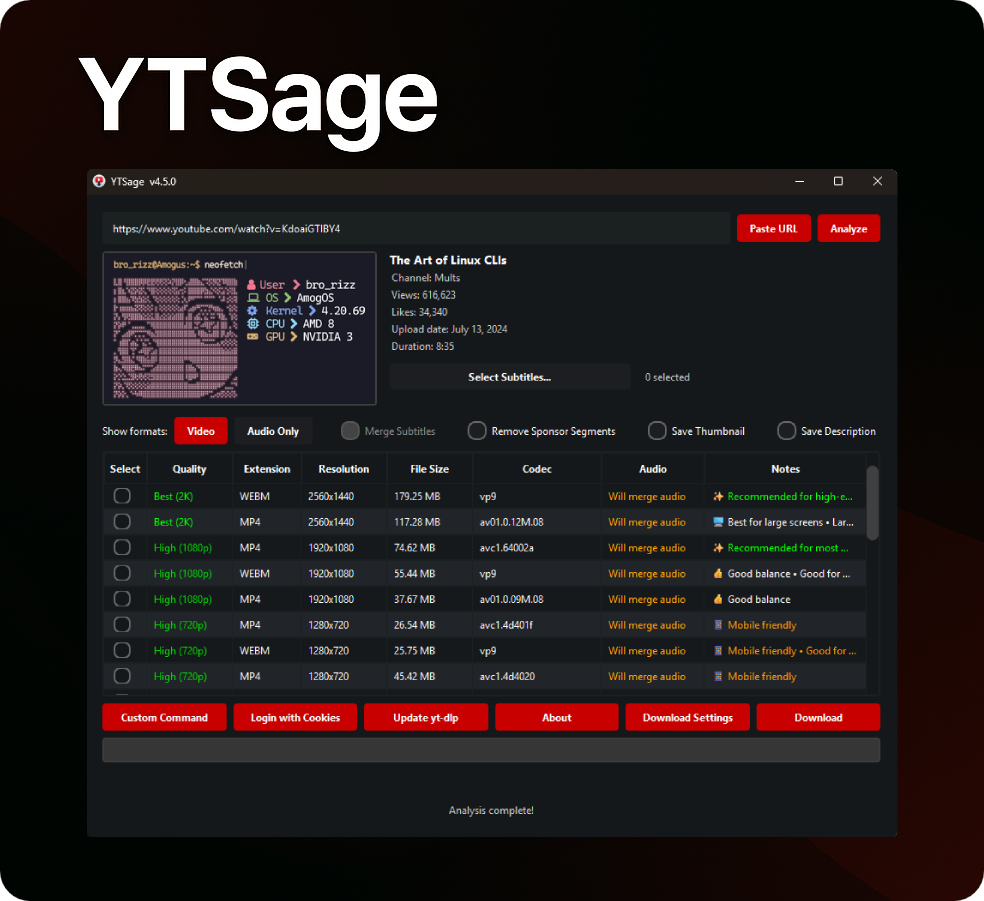
Main Interface
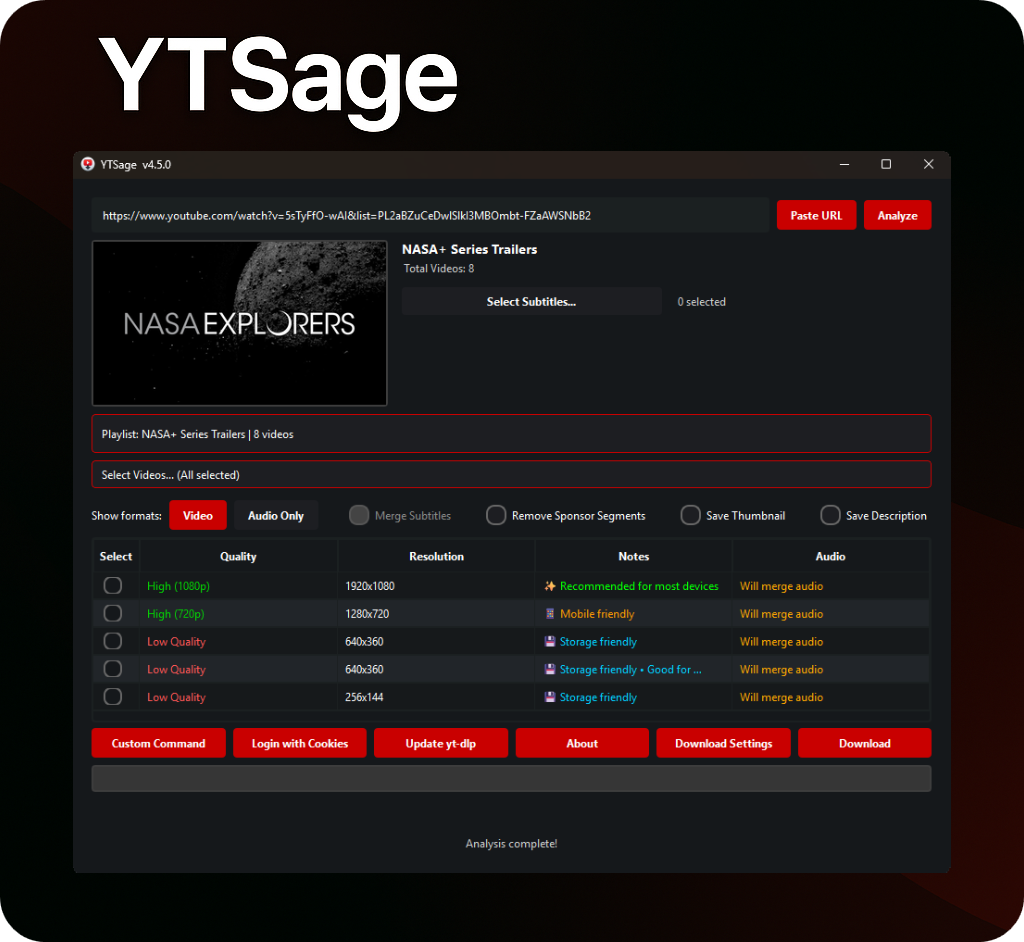
Playlist Download
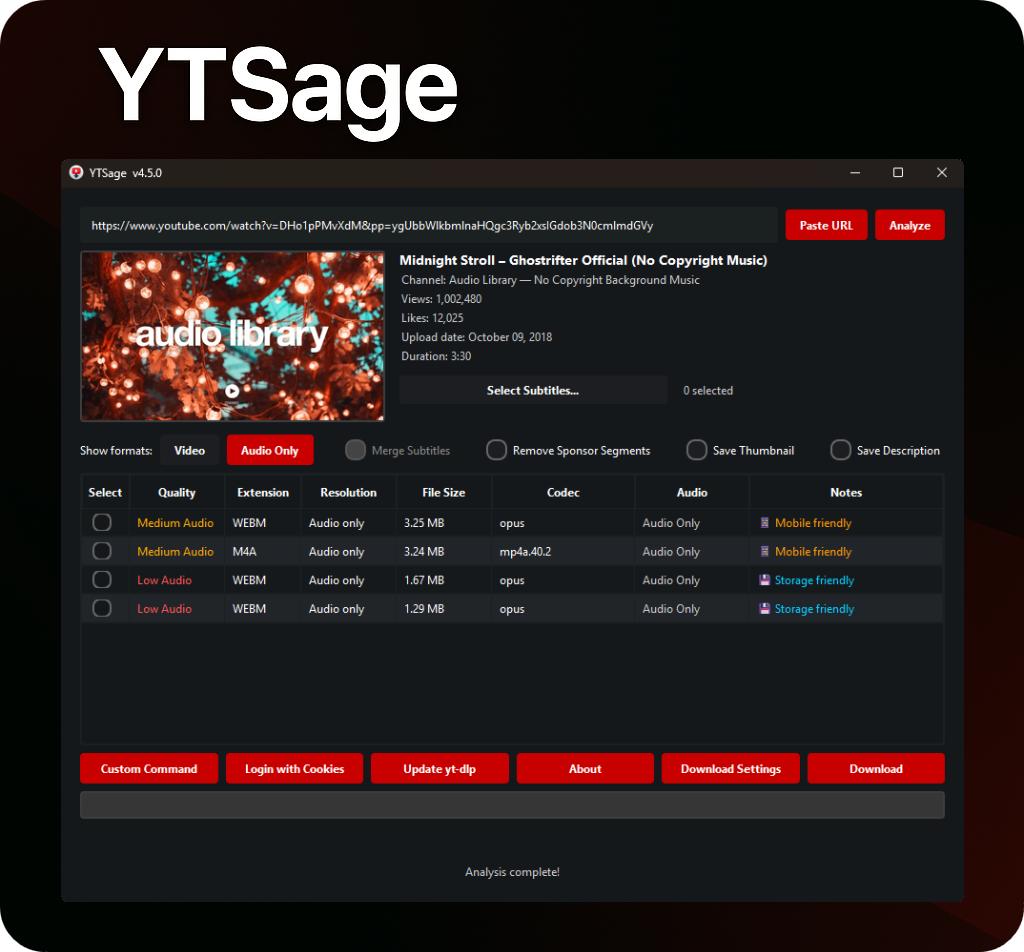
Audio Format
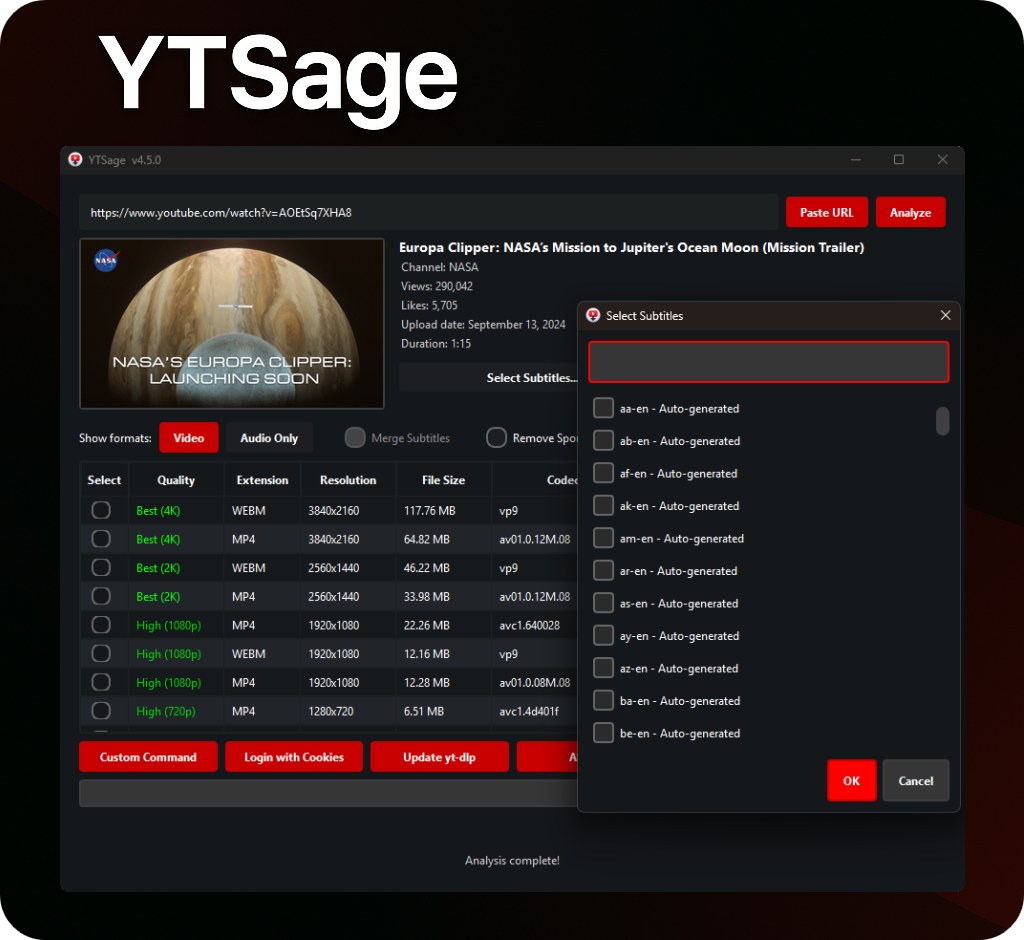
Subtitle Options
## 📖 Usage
🎯 Basic Usage
1. **Launch YTSage**
2. **Paste YouTube URL** (or use "Paste URL" button)
3. **Click "Analyze"**
4. **Select Format:**
- `Video` for video downloads
- `Audio Only` for audio extraction
5. **Choose Options:**
- Enable subtitles & select language
- Enable subtitle merge
- Save thumbnail
- Remove sponsor segments
- Save description
- Embed chapters
6. **Select Output Directory**
7. **Click "Download"**
📋 Playlist Download
1. **Paste Playlist URL**
2. **Click "Analyze"**
3. **Select videos from the playlist selector (optional, defaults to all)**
4. **Choose desired format/quality**
5. **Click "Download"**
> 💡 The application automatically handles the download queue
🧰 Advanced Options
- **Quality Selection:** Choose the highest resolution for best quality
- **Subtitle Options:** Filter languages and embed into video
- **Custom Commands:** Access advanced yt-dlp features
- **Save Description:** Save the description of the video
- **Save Thumbnail:** Save the thumbnail of the video
- **Embed Chapters:** Embed chapter markers as metadata in the downloaded video file for compatible video players
- **Remove Sponsor Segments:** Remove sponsor segments from the video
- **Speed Limiter:** Limit the download speed
- **Login with Cookies:** Login to YouTube using cookies to access private content
How to use it:
1. **Recommended:** Use the built-in "Extract cookies from browser" option in the app. Select your browser (Chrome, Firefox, etc.) and then select Profile (optional).
2. Alternatively, extract cookies manually:
a. Extract cookies from your browser using an extension like [cookie-editor](https://github.com/moustachauve/cookie-editor?tab=readme-ov-file)
b. Copy the cookies in Netscape format
c. Create a file named `cookies.txt` and paste the cookies into it
d. Select the `cookies.txt` file in the app
- **Save Download Path:** Save the download path
- **Update yt-dlp:** Update yt-dlp
- **FFmpeg/yt-dlp Detection:** Automatically detect FFmpeg/yt-dlp
- **Trim Video:** Download only specific parts of a video by specifying time ranges (HH:MM:SS format)
## 🛠️ Troubleshooting
Click to view common issues and solutions
- **Format table not displaying:** Update yt-dlp to the latest version.
- **Download fails:** Check your internet connection and ensure the video is available.
- **Specific download errors:**
- **Private videos:** Use cookie authentication to access private content.
- **Age-restricted content:** Login to YouTube account to view age-restricted videos.
- **Geo-blocked videos:** Consider using a VPN to bypass regional restrictions.
- **Removed/deleted videos:** Video is no longer available on YouTube.
- **Live streams:** Live streams cannot be downloaded; wait for the stream to end.
- **Network errors:** Check your internet connection and try again.
- **Invalid URLs:** Ensure the URL is correct and from a supported platform.
- **Premium content:** Requires YouTube Premium membership.
- **Copyright blocks:** Content is blocked due to copyright restrictions.
- **Separate video and audio files after download:** This happens when FFmpeg is missing or not detected. YTSage requires FFmpeg to merge high-quality video and audio streams.
- **Solution:** Ensure FFmpeg is installed and accessible in your system's PATH. For Windows users, the easiest option is to download the `YTSage-v-ffmpeg.exe` file, which comes bundled with FFmpeg.
---
#### 🛡️ Windows Defender / Antivirus Warning
Some antivirus software may flag the `.exe` files as false positives. This is a **known limitation** of packaged applications.
**Why this happens:**
- Antivirus heuristics can misidentify packed executables as suspicious
**Safe alternatives:**
- ✅ **Use pip installation:** `pip install ytsage` (recommended)
- ✅ **Build from source**: by following this [guide](.github/CI_CD_README.md)
- ✅ **Whitelist the application** in your antivirus software
#### 🍎 macOS: "App is damaged and can’t be opened"
If you see this error on macOS Sonoma or newer, you need to remove the quarantine attribute.
1. **Open Terminal** (you can find it using Spotlight).
2. **Type the following command** but **do not** press Enter yet. Make sure to include the space at the end:
```bash
xattr -d com.apple.quarantine
```
3. **Drag the `YTSage.app` file** from your Finder window and drop it directly into the Terminal window. This will automatically paste the correct file path.
4. **Press Enter** to run the command.
5. **Try opening YTSage.app again.** It should now launch correctly.
---
#### **Configuration Locations (Advanced)**
- **Windows:** `%LOCALAPPDATA%\YTSage`
- **macOS:** `~/Library/Application Support/YTSage`
- **Linux:** `~/.local/share/YTSage`
## 👥 Contributing
We welcome contributions! Here's how you can help:
1. 🍴 Fork the repository
2. 🌿 Create your feature branch:
```bash
git checkout -b feature/AmazingFeature
```
3. 💾 Commit your changes:
```bash
git commit -m 'Add some AmazingFeature'
```
4. 📤 Push to the branch:
```bash
git push origin feature/AmazingFeature
```
5. 🔄 Open a Pull Request
📂 Project Structure
## YTSage - Project Structure
This document describes the organized folder structure of YTSage.
### 📁 Project Structure
```
YTSage/
├── 📁 .github/ # GitHub configuration
│ ├── 📄 CI_CD_README.md # CI/CD documentation
│ ├── 📁 ISSUE_TEMPLATE/ # Issue templates
│ │ └── 🐛-bug-report.md # Bug report template
│ └── 📁 workflows/ # GitHub Actions workflows
│ ├── build-linux.yml # Linux build workflow
│ ├── build-macos.yml # macOS build workflow
│ └── build-windows.yml # Windows build workflow
├── .gitignore # Git ignore rules
├── 📁 assets/ # Static assets and resources
│ ├── 📁 branding/ # Branding assets
│ │ ├── 📁 icons/ # Application icons
│ │ │ ├── icon.icns # macOS icon
│ │ │ ├── icon.png # PNG icon
│ │ │ └── YTSage.ico # Windows icon
│ │ └── 📁 screenshots/ # Screenshots for documentation
│ │ ├── audio_format.png
│ │ ├── main.png
│ │ ├── playlist.png
│ │ └── subtitle_options.png
│ ├── 📁 Icon/ # Legacy icon directory
│ │ └── icon.png
│ └── 📁 sound/ # Audio files
│ └── notification.mp3
├── 📄 LICENSE # License file
├── 📄 main.py # Application entry point
├── 📄 README.md # Project documentation
├── 📄 requirements.txt # Python dependencies
└── 📁 src/ # Source code
├── 📄 __init__.py # Main package init
├── 📁 core/ # Core business logic
│ ├── 📄 __init__.py # Core package init
│ ├── 📄 ytsage_downloader.py # Download functionality
│ ├── 📄 ytsage_ffmpeg.py # FFmpeg integration
│ ├── 📄 ytsage_logging.py # Logging utilities
│ ├── 📄 ytsage_style.py # UI styling
│ ├── 📄 ytsage_utils.py # Utility functions
│ └── 📄 ytsage_yt_dlp.py # yt-dlp integration
├── 📁 gui/ # User interface components
│ ├── 📄 __init__.py # GUI package init
│ ├── 📄 ytsage_gui_format_table.py # Format table functionality
│ ├── 📄 ytsage_gui_main.py # Main application window
│ ├── 📄 ytsage_gui_video_info.py # Video information display
│ └── 📁 ytsage_gui_dialogs/ # Dialog classes
│ ├── 📄 __init__.py # Dialogs package init
│ ├── 📄 ytsage_dialogs_base.py # Basic dialogs
│ ├── 📄 ytsage_dialogs_custom.py # Custom functionality dialogs
│ ├── 📄 ytsage_dialogs_ffmpeg.py # FFmpeg-related dialogs
│ ├── 📄 ytsage_dialogs_selection.py # Selection dialogs
│ ├── 📄 ytsage_dialogs_settings.py # Settings dialogs
│ └── 📄 ytsage_dialogs_update.py # Update dialogs
└── 📁 utils/ # Utility modules
├── 📄 __init__.py # Utils package init
└── 📄 ytsage_constants.py # Application constants
```
## ⭐️ Star History
## Star History
## 📜 License
This project is licensed under the MIT License - see the [LICENSE](LICENSE) file for details.
## 🙏 Acknowledgments
Show Acknowledgments
A heartfelt thank you to everyone who has contributed to this project by opening an issue to suggest an improvement or report a bug.
 [](https://badge.fury.io/py/ytsage)
[](https://opensource.org/licenses/MIT)
[](https://www.python.org/downloads/)
[](https://pepy.tech/project/ytsage)
[](https://github.com/oop7/YTSage/stargazers)
**A modern YouTube downloader with a clean PySide6 interface.**
Download videos in any quality, extract audio, fetch subtitles, and more.
[](https://badge.fury.io/py/ytsage)
[](https://opensource.org/licenses/MIT)
[](https://www.python.org/downloads/)
[](https://pepy.tech/project/ytsage)
[](https://github.com/oop7/YTSage/stargazers)
**A modern YouTube downloader with a clean PySide6 interface.**
Download videos in any quality, extract audio, fetch subtitles, and more.